
Corporate video production delivers an average return of $5 for every dollar spent, according to Wistia's 2026 Video Marketing Report. Yet most corporate videos fail because they're forgettable. Safe, generic, and optimized for nobody.
This guide walks you through the full production process, real cost breakdowns, and how to measure results that matter to your business.
Marketers used to treat video like their marketing dessert. We all loved it, but we'd only have it once in a while for a special occasion. In 2026, we're going to see more companies starting their strategy with video, treating it more as the main course.
What is corporate video production?
Corporate video production is the process of creating video content for specific business goals, including marketing, internal communications, training, recruitment, and brand storytelling. Unlike consumer content, corporate videos serve defined objectives with measurable outcomes.
This article covers B2B and corporate video production for business audiences. We focus on planning, production workflows, costs, and performance measurement. Consumer advertising and entertainment content fall outside the scope.
The corporate video market reached $18.5 billion globally in 2025, according to Grand View Research's Video Production Services Market Report. That figure is projected to hit $24.3 billion by 2028.
"Corporate video is no longer a nice-to-have for B2B companies. It's the primary way decision-makers evaluate vendors before taking a sales call," says Tyler Lessard, VP of Marketing at Vidyard.
Types of corporate videos
1. Explainer videos
Explainer videos simplify complex products or services in 60 to 90 seconds. They work best for SaaS, enterprise software, and technical B2B products.
Explainer videos on landing pages increase conversions by 80%, according to HubSpot's 2026 State of Marketing Report. Dropbox famously grew from 0 to 100 million users partly through a single explainer video on their homepage.
Dropbox - Original Explainer Video
2. Customer testimonial videos
Customer testimonials showcase verified results with specific numbers and measurable outcomes. Authentic testimonials outperform scripted endorsements by 3x in conversion rates, per Wistia's benchmark data.
The key to effective testimonials: real customers speaking about real problems and real results. Not actors reading marketing copy.
3. Training and onboarding videos
Training videos deliver consistent onboarding and skills development at scale. Companies using video training reduce onboarding time by 40% compared to document-based training, according to Vidyard's 2026 Business Video Benchmark.
Forrester Research estimates that employees are 75% more likely to watch a video than read a document, email, or web article.
4. Company culture videos
Culture videos attract talent by showing real team dynamics, work environment, and company values in action. These generate 36% more applications than text-only job postings, per LinkedIn's 2026 Talent Trends Report.
5. Product demo videos
Product demos walk prospects through features, use cases, and workflows. They reduce support tickets by 28% and accelerate sales cycles by reducing time-to-decision, according to Gartner's 2025 B2B Buying Behavior Survey.
"Buyers who watch product demo videos are 1.81x more likely to purchase than those who don't," says Michael Litt, CEO and Co-Founder of Vidyard. "The demo video has become the modern sales pitch."
Corporate video production process
Step 1: Pre-production planning
Timeline: 1 to 2 weeks for standard projects.
Define goals, target audience, core message, and success metrics before anything else. Then create scripts, storyboards, and shot lists. Lock down locations, talent, and equipment.
Key deliverables in this phase:
- Creative brief with measurable objectives
- Approved script (word-for-word or bullet-point format)
- Shot list with scene descriptions
- Production schedule with contingency days
- Distribution plan (plan distribution before filming, not after)
Step 2: Production (filming)
Timeline: 1 to 3 days depending on complexity.
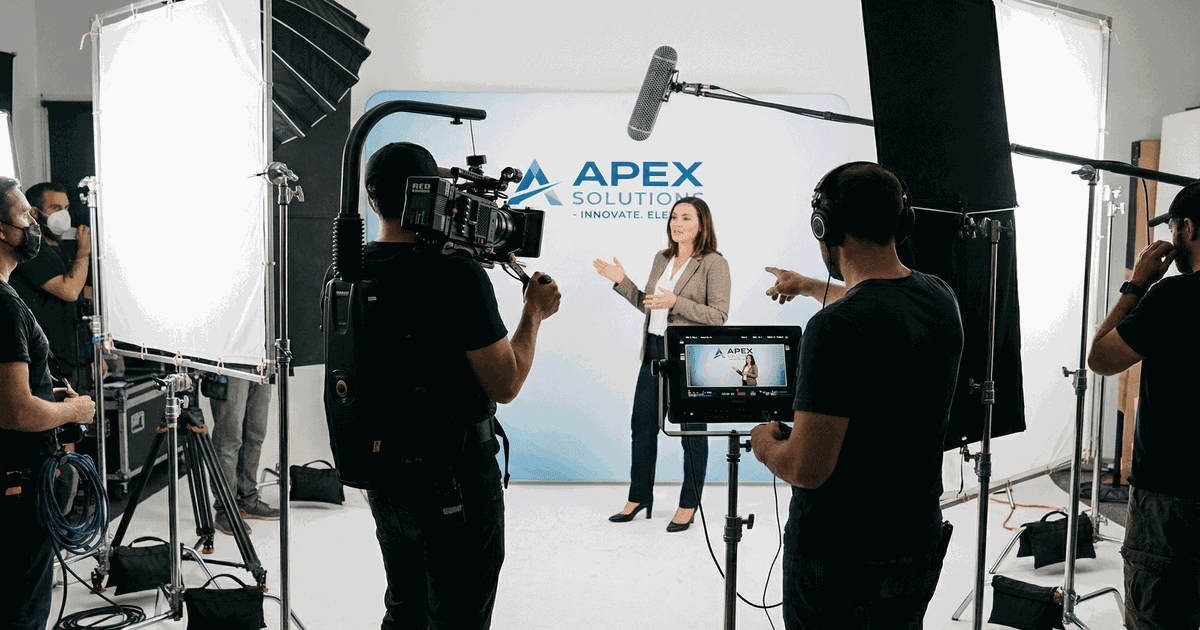
Capture all footage according to your shot list. Professional productions use multi-camera setups, three-point lighting minimum, and high-quality audio recording.
Critical production elements:
- Lighting setup (three-point lighting for talking heads, diffused panels for product shots)
- Audio quality (lavalier mics for interviews, boom mics for wide shots)
- B-roll footage (capture 3x more than you think you need)
- Backup recordings (always record to multiple cards)
A common mistake here: skipping sound checks. Bad audio kills a video faster than bad visuals. Viewers forgive shaky camera work. They won't sit through muffled dialogue.
AI isn't a trend anymore, it isn't going back in the box. We need to start thinking about AI like any other tool. What new possibilities does it offer to us? How can it make the creative journey easier or better? Is this what will allow production to hit new levels of responsiveness or individualisation?
Step 3: Post-production editing
Timeline: 1 to 3 weeks depending on revisions.
Post-production determines whether your video looks professional or generic. The editing phase includes:
- Rough cut assembly from best takes
- Color grading for brand consistency
- Audio mixing and noise reduction
- Motion graphics, titles, and lower thirds
- Revisions (typically 2 to 3 rounds)
- Caption and subtitle generation
According to Aberdeen Group's research, adding captions increases video completion rates by 12%. Considering 73% of social video is watched without sound (Verizon Media 2026 Video Benchmark), captions are not optional.
Step 4: Distribution and promotion
Timeline: Ongoing.
Production is 30% of the work. Distribution is 70%. A $25,000 video sitting on a hidden webpage generates zero ROI.
Distribution channels to cover:
- Website (landing pages, product pages, about page)
- Social media (LinkedIn for B2B, YouTube for long-form, Instagram for awareness)
- Email campaigns (embedded or linked video drives 200-300% higher click-through rates, per Campaign Monitor)
- Sales enablement (shared by reps in outbound conversations)
Need video content built for your specific use case?
Corporate, demo, testimonial, product - we'll match the format to your goals.
Book a Discovery CallHow to plan a corporate video
Define clear goals
Start with business outcomes, not video outputs. Wrong goal: "Create a 2-minute explainer video." Right goal: "Reduce product demo calls by 30% using self-serve video content."
Goal framework by funnel stage:
- Awareness: reach new audiences, build brand recognition
- Consideration: educate prospects, show differentiation
- Conversion: drive trials, demos, purchases
- Retention: onboard customers, reduce churn, increase expansion revenue
Know your audience
B2B decision-makers watch an average of 17 minutes of video content per week during the research phase, according to LinkedIn's B2B Marketing Insights 2026. That's a narrow window to earn attention.
Audience research questions to answer before scripting:
- What problems do they face that this video solves?
- What objections need addressing?
- What format do they prefer (short social clips vs long-form deep dives)?
- Where do they consume video (desktop vs mobile, LinkedIn vs YouTube)?
Craft your core message
One video, one message. Trying to cover too much dilutes impact and kills retention.
AI-powered search engines will increasingly be able to determine the value or worth of a video through its content. That makes the quality of the writing and creativity behind a video more valuable than ever.
Message testing framework:
- Can you state the core message in 10 words or less?
- Does it focus on customer outcomes (not product features)?
- Is it differentiated from what competitors say?
- Can viewers recall it 24 hours later?
"The biggest mistake in corporate video is trying to say everything in one piece," says Brendan Schwartz, CTO and Co-Founder of Wistia. "Pick one message. Say it clearly. Trust viewers to come back for more."
Set a realistic budget
Corporate video budgets range from $1,000 for DIY projects with existing gear to $50,000+ for full agency productions with animation and custom music. See the detailed cost breakdown in the next section.
Corporate video production costs
| Production approach | Cost range | Best for | Typical timeline |
|---|---|---|---|
| DIY internal | $500-$2,000 | Internal comms, quick updates | 1-2 weeks |
| Freelance producer | $2,000-$8,000 | Testimonials, basic demos | 2-3 weeks |
| Mid-tier agency | $8,000-$25,000 | Professional marketing videos | 4-6 weeks |
| Full production agency | $25,000-$100,000+ | Brand campaigns, complex productions | 8-12 weeks |
| AI-enhanced production | $3,000-$12,000 | High-volume needs, fast turnaround | 1-3 weeks |
What drives production costs
Length and complexity: A simple talking head costs $2,000 to $5,000. Multi-location shoots run $10,000 to $30,000. Adding animation or motion graphics adds $5,000 to $20,000 on top.
Talent: Employee interviews cost $0 in direct talent fees. Professional actors run $500 to $2,000 per day. Voice-over artists charge $200 to $1,000 per project.
Equipment and crew: A basic setup (1 camera, 1 operator) costs $1,000 to $2,000 per day. A professional crew (3 cameras, lighting, sound) runs $5,000 to $10,000 per day.
I still remember when I started, it took four to five weeks to create a video, one video, and it's nearly $40,000-$50,000. Now it is just four to five minutes. If you have a nice script, you feed it, two minutes, you will have everything, two minutes for you to edit, improve here and there.
Post-production: Basic editing costs $500 to $2,000. Advanced editing with graphics runs $3,000 to $10,000. Original music composition adds $1,000 to $5,000.
In-house vs freelancer vs agency
| Factor | In-house team | Freelancer | Agency | AI-enhanced agency |
|---|---|---|---|---|
| Cost per video | $500-$3,000 | $2,000-$8,000 | $10,000-$50,000+ | $3,000-$12,000 |
| Quality ceiling | Medium | Variable | High | High |
| Speed | Fast (1-2 weeks) | Medium (2-4 weeks) | Slow (6-12 weeks) | Fast (1-3 weeks) |
| Strategic input | Limited | None | Strong | Strong |
| Scalability | High volume, lower quality | Low volume | Low volume, high quality | High volume, high quality |
| Best for | 10+ videos/year, internal content | One-off projects | Flagship campaigns | Speed + quality at scale |
ROI calculation formula
ROI = (Revenue Generated - Total Production Cost) / Total Production Cost x 100%
Example: A SaaS company spent $15,000 on a product demo video. That video drove 120 demo requests over 6 months. Their demo-to-customer conversion rate is 25%, with an average customer value of $12,000.
- Customers from video: 120 demos x 25% = 30 customers
- Revenue generated: 30 x $12,000 = $360,000
- ROI: ($360,000 - $15,000) / $15,000 x 100% = 2,300%
According to Demand Metric, video marketers get 66% more qualified leads per year compared to non-video marketers. The investment pays for itself quickly when distribution is handled correctly.
Corporate video best practices
Lead with story, not features
Boring corporate videos list features. Scroll-stopping corporate videos tell stories about problems solved and transformations achieved.
Story structure that works:
- Show the problem (make it relatable and specific)
- Introduce the solution (your product or service as the tool, not the hero)
- Demonstrate the transformation (measurable outcomes)
- Clear next step (specific CTA with one action)
Optimize for sound-off viewing
73% of social media video is watched with sound off, per Verizon Media's 2026 Video Benchmark Report. Every important point needs on-screen text or captions. No exceptions.
Match length to platform and goal
Optimal length varies by context:
- LinkedIn awareness: 30 to 60 seconds
- Product demos: 90 to 180 seconds
- Customer testimonials: 60 to 90 seconds
- Training modules: 3 to 7 minutes per module
- YouTube thought leadership: 7 to 12 minutes
Professional doesn't mean stiff
This is where most B2B companies get it wrong. "Professional" doesn't mean robotic, corporate-speak, stock-footage filler. It means clear, confident, and authentic.
At GFL, we work with B2B companies to create corporate videos that feel human. Real employees, authentic stories, scroll-stopping hooks borrowed from viral content principles. The result: corporate videos people choose to watch, not corporate videos people are forced to watch.
We helped a cybersecurity company turn their corporate explainer from a feature dump into a story about a CISO's 3am security crisis. That video generated 5M views on LinkedIn and drove 3x more demo requests than their previous corporate content.
Use AI as an instrument, not a shortcut
AI-enhanced production accelerates timelines and reduces costs without sacrificing quality. At GFL, we use AI for:
- Rapid B-roll generation (reducing shoot days by 50%)
- Voiceover production in multiple languages
- Auto-captioning and subtitle generation
- Initial editing assembly (human refinement follows every AI output)
This workflow delivers professional corporate videos in 1 to 3 weeks instead of 6 to 8 weeks, at 40% lower cost than traditional full-service agencies. The creative direction, storytelling, and brand strategy stay human. The repetitive production tasks get automated.
What would a custom video strategy look like for your company?
We'll scope your project, outline the approach, and give you a real timeline.
Get a Free ConsultationCommon mistakes to avoid
1. No distribution plan before filming
Plan distribution before you start filming. Most companies spend 100% of their energy on production and 0% on distribution. Then they wonder why their $25,000 video got 52 views.
Distribution checklist:
- Website placement (which pages, above or below fold)
- Social promotion schedule (platform-specific cuts and posting calendar)
- Email campaign integration (which segments, what triggers)
- Sales enablement workflow (how reps access and share the video)
2. Overscripting interviews
Scripted interviews sound scripted. Viewers can tell. Real conversations connect on a level that rehearsed performances cannot.
Provide interviewees with talking points, not scripts. Ask open questions. Let them speak naturally. Edit for clarity without losing authenticity.
3. Ignoring mobile viewers
62% of B2B video consumption happens on mobile devices, per LinkedIn's 2026 data. If your video doesn't work on a phone, it doesn't work for most of your audience.
Mobile optimization:
- Vertical or square formats for social platforms
- Text large enough to read on a 6-inch screen
- Hooks within first 3 seconds (before the thumb scrolls past)
4. No clear call-to-action
Every video needs a specific, single CTA. Not "learn more." Not "contact us." Something measurable.
Strong CTAs: "Book a demo at [URL]." "Download the checklist at [URL]." "See pricing at [URL]."
Weak CTAs: "Learn more." "Visit our website." "Get in touch."
5. One video for all platforms
A 3-minute YouTube video underperforms on Instagram. Platform-specific edits drive 4x better engagement than one-size-fits-all uploads.
Create platform variants:
- Full version (2-3 min) for website and YouTube
- Social cuts (30-60 sec) for LinkedIn and Instagram
- Teaser clips (15 sec) for paid promotion and stories
"Brands that repurpose a single piece of video content into 5+ platform-specific formats see 4.2x higher total engagement," says Rand Fishkin, CEO of SparkToro.
How to measure corporate video ROI
Vanity metrics vs business metrics
Views, likes, and shares feel good but don't drive business decisions. The metrics that matter tie directly to revenue:
| Goal | Primary KPI | Secondary KPI | Target benchmark |
|---|---|---|---|
| Awareness | Reach, impressions | View-through rate | 70%+ VTR |
| Consideration | Engagement rate | Click-through rate | 3%+ CTR |
| Conversion | Conversion rate | Cost per conversion | 15%+ CVR |
| Retention | Completion rate | Support ticket reduction | 80%+ completion |
Attribution models for video
First-touch attribution gives video credit if it's the first interaction before conversion. Last-touch gives credit if it's the final interaction. Multi-touch distributes credit across the customer journey.
Most B2B sales involve 6 to 8 touchpoints. Use multi-touch attribution for accurate ROI measurement. Single-touch models undercount or overcount video's contribution.
Tracking tools
- Website video: Wistia or Vidyard (track play rate, engagement heatmaps, CTA clicks)
- Social video: native platform analytics (LinkedIn Video Analytics, YouTube Studio)
- Attribution: Google Analytics 4 with UTM parameters, HubSpot, or Salesforce
Corporate video production checklist
Use this checklist for every corporate video project:
Pre-production:
- Define business goal and success metrics
- Identify target audience and platform
- Write and approve script or talking points
- Create shot list and storyboard
- Scout locations and confirm access
- Book talent and crew
- Prepare equipment and props
- Finalize distribution plan
Production day:
- Arrive early for setup and testing
- Record audio tests before filming
- Capture B-roll (3x planned amount)
- Record backup footage to multiple cards
- Get signed release forms from on-camera talent
Post-production:
- Organize footage and create proxies
- Assemble rough cut based on script
- Add graphics, titles, and lower thirds
- Color grade for brand consistency
- Mix audio and add music/sound design
- Export platform-specific versions
- Add captions and subtitles
Distribution:
- Upload to hosting platform (Wistia, Vimeo, or YouTube)
- Embed on website landing pages
- Create social media cuts (30-60 sec)
- Schedule social promotion posts
- Send to sales team with usage guidelines
- Set up tracking (UTM codes, event tracking)
Measurement:
- Configure analytics and attribution
- Monitor performance weekly for first month
- A/B test thumbnail and title variations
- Measure against success metrics at 30/60/90 days
- Document learnings for next project
External sources:
Related articles:
- For step-by-step production workflows, see corporate video production guide.
- Need inspiration? Explore corporate video ideas that drive engagement.
- Technical products need specialized approaches. Learn how to create software demo videos that convert.
- See video testimonial examples from B2B companies.
- Explore corporate video ideas by business goal for format inspiration.
- Start with our corporate video guide for beginners.